
Abstract
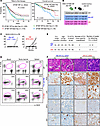
RNA splicing factor SF3B1 is one of the most recurrently mutated genes in chronic lymphocytic leukemia (CLL) and frequently co-occurs with chromosome 13q deletion [del(13q)]. This combination is associated with poor prognosis in CLL, suggesting these lesions increase CLL aggressiveness. While del(13q) in murine B cells (minimal deleted region of 13q14 includes DLEU1, DLEU2, and miR15a-16-1; Mdr mice), but not expression of Sf3b1-K700E, drives the initiation of CLL, we hypothesize that SF3B1 mutation accelerates CLL progression. In this study, we crossed mice with a B cell–specific Sf3b1-K700E allele with Mdr mice to determine the impact of Sf3b1 mutation on CLL progression. We found that the co-occurrence of these 2 lesions in murine B cells caused acceleration of CLL. We showed that Sf3b1-K700E impacted alternative RNA splicing of nuclear factor of activated T cells C1 (Nfatc1) and activated mTOR signaling and the MYC pathway, contributing to CLL acceleration. Moreover, concurrent inhibition of RNA splicing and the mTOR pathway led to cell death in vitro and in vivo in murine CLL cells with SF3B1 mutation and del(13q). Our results thus suggest that SF3B1 mutation contributes to the aggressiveness of CLL by activating the mTOR pathway through alternative splicing of Nfatc1, providing a rationale for targeting mTOR and RNA splicing in the subset of CLL patients with both SF3B1 mutations and del(13q).
Authors
Bo Zhang, Prajish Iyer, Meiling Jin, Elisa Ten Hacken, Zachary J. Cartun, Kevyn L. Hart, Mike Fernandez, Kristen Stevenson, Laura Rassenti, Emanuela M. Ghia, Thomas J. Kipps, Donna Neuberg, Ruben Carrasco, Wing C. Chan, Joo Y. Song, Yu Hu, Catherine J. Wu, Lili Wang
This file is in Adobe Acrobat (PDF) format. If you have not installed and configured the Adobe Acrobat Reader on your system.
Having trouble reading a PDF?
PDFs are designed to be printed out and read, but if you prefer to read them online, you may find it easier if you increase the view size to 125%.
Having trouble saving a PDF?
Many versions of the free Acrobat Reader do not allow Save. You must instead save the PDF from the JCI Online page you downloaded it from. PC users: Right-click on the Download link and choose the option that says something like "Save Link As...". Mac users should hold the mouse button down on the link to get these same options.
Having trouble printing a PDF?
- Try printing one page at a time or to a newer printer.
- Try saving the file to disk before printing rather than opening it "on the fly." This requires that you configure your browser to "Save" rather than "Launch Application" for the file type "application/pdf", and can usually be done in the "Helper Applications" options.
- Make sure you are using the latest version of Adobe's Acrobat Reader.


